
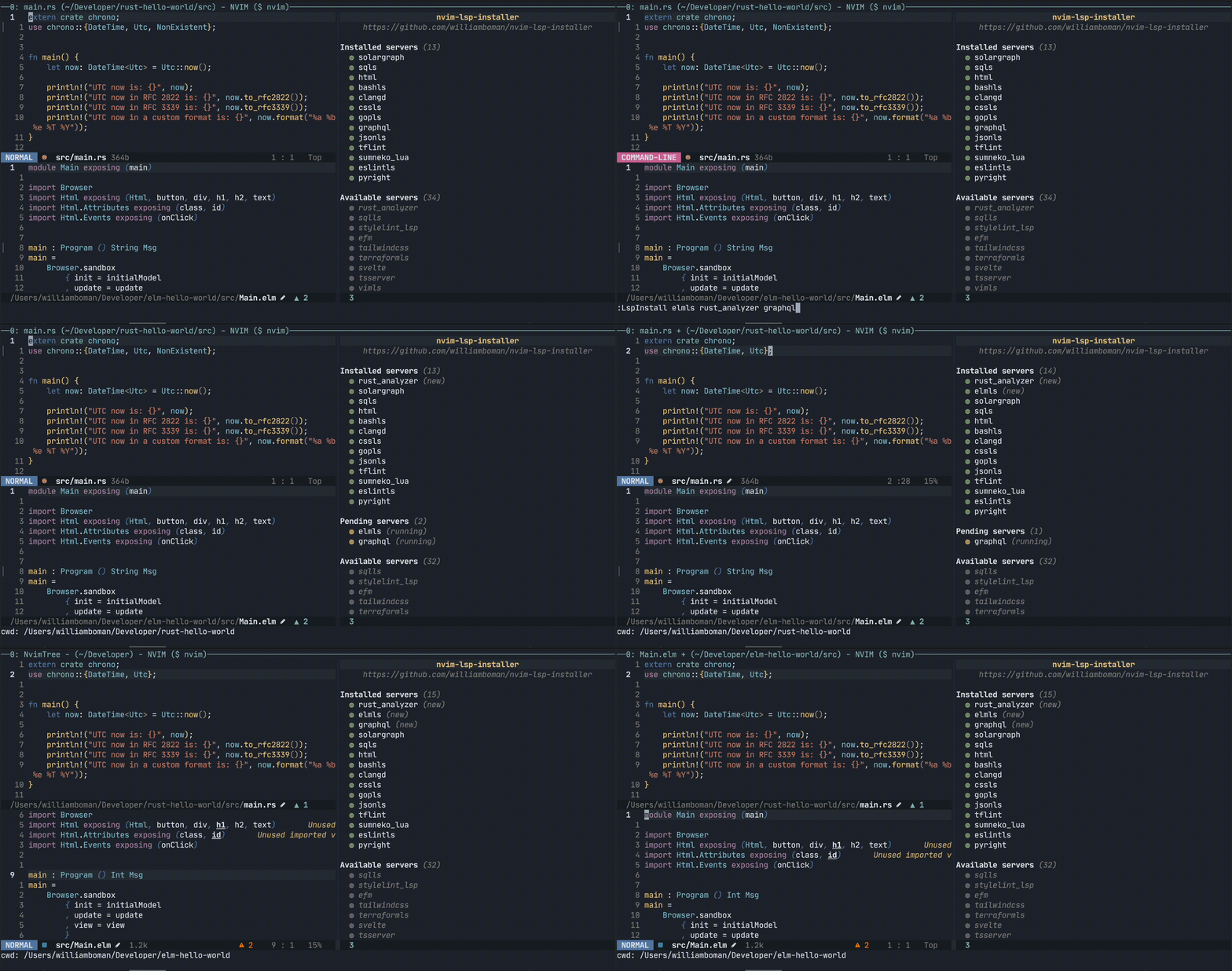
## About
Companion plugin for [nvim-lspconfig](https://github.com/neovim/nvim-lspconfig) that allows you to seamlessly install
LSP servers locally (inside `:echo stdpath("data")`).
On top of just providing commands for installing & uninstalling LSP servers, it:
- provides a graphical UI
- optimized for blazing fast startup times
- supports installing custom versions of LSP servers (for example `:LspInstall rust_analyzer@nightly`)
- provides configurations for servers that aren't supported by nvim-lspconfig (`eslint`)
- common install tasks are abstracted behind Lua APIs (has direct integration with libuv via vim.loop)
-  full support for Windows
## Installation
Requires neovim `>= 0.5.0` and [nvim-lspconfig](https://github.com/neovim/nvim-lspconfig). The full requirements to
install all servers are:
- For Unix systems: bash(1), git(1), wget(1), unzip(1), tar(1), gzip(1)
- For Windows systems: powershell, git, gzip, tar
- Node.js (LTS) & npm
- Python3 & pip3
- go
- javac
- Ruby & gem
### [Packer](https://github.com/wbthomason/packer.nvim)
```lua
use {
'neovim/nvim-lsp-config',
'williamboman/nvim-lsp-installer',
}
```
### vim-plug
```vim
Plug 'neovim/nvim-lspconfig'
Plug 'williamboman/nvim-lsp-installer'
```
## Usage
### Commands
- `:LspInstallInfo` - opens a graphical overview of your language servers
- `:LspInstall ...` - installs/reinstalls language servers
- `:LspUninstall ...` - uninstalls language servers
- `:LspUninstallAll` - uninstalls all language servers
- `:LspPrintInstalled` - prints all installed language servers
### Setup
```lua
local lsp_installer = require("nvim-lsp-installer")
lsp_installer.on_server_ready(function(server)
local opts = {}
-- (optional) Customize the options passed to the server
-- if server.name == "tsserver" then
-- opts.root_dir = function() ... end
-- end
-- This setup() function is exactly the same as lspconfig's setup function (:help lspconfig-quickstart)
server:setup(opts)
vim.cmd [[ do User LspAttachBuffers ]]
end)
```
For more advanced use cases you may also interact with more APIs nvim-lsp-installer has to offer, for example the following (refer to `:help nvim-lsp-installer` for more docs):
```lua
local lsp_installer_servers = require'nvim-lsp-installer.servers'
local ok, rust_analyzer = lsp_installer_servers.get_server("rust_analyzer")
if ok then
if not rust_analyzer:is_installed() then
rust_analyzer:install()
end
end
```
### Configuration
You can configure certain behavior of nvim-lsp-installer by calling the `.settings()` function.
Refer to the [default configuration](#default-configuration) for all available settings.
Example:
```lua
require("nvim-lsp-installer").settings {
ui = {
icons = {
server_installed = "✓",
server_pending = "➜",
server_uninstalled = "✗"
}
}
}
```
#### Default configuration
```lua
local DEFAULT_SETTINGS = {
ui = {
icons = {
-- The list icon to use for installed servers.
server_installed = "◍",
-- The list icon to use for servers that are pending installation.
server_pending = "◍",
-- The list icon to use for servers that are not installed.
server_uninstalled = "◍",
},
},
-- Controls to which degree logs are written to the log file. For example, it's useful to set this to
-- vim.log.levels.TRACE when debugging issues with server installations.
log_level = vim.log.levels.WARN,
-- Whether to allow LSP servers to share the same installation directory.
-- For some servers, this effectively causes more than one server to be
-- installed (and uninstalled) when executing `:LspInstall` and
-- `:LspUninstall`.
-- For example, installing `cssls` will also install both `jsonls` and `html`
-- (and the other ways around), as these all share the same underlying
-- package.
allow_federated_servers = true,
}
```
## Available LSPs
| Language | Server name |
| ----------------------------------- | ------------------------ |
| Angular | `angularls` |
| Ansible | `ansiblels` |
| Bash | `bashls` |
| C# | `omnisharp` |
| C++ | `clangd` |
| CMake | `cmake` |
| CSS | `cssls` |
| Clojure | `clojure_lsp` |
| Deno | `denols` |
| Diagnostic (general purpose server) | `diagnosticls` |
| Docker | `dockerls` |
| Dot | `dotls` |
| EFM (general purpose server) | `efm` |
| ESLint [(docs)][eslintls] | `eslintls` |
| Elixir | `elixirls` |
| Elm | `elmls` |
| Ember | `ember` |
| Fortran | `fortls` |
| Go | `gopls` |
| GraphQL | `graphql` |
| Groovy | `groovyls` |
| HTML | `html` |
| Haskell | `hls` |
| JSON | `jsonls` |
| Java | `jdtls` |
| Jedi | `jedi_language_server` |
| Kotlin | `kotlin_language_server` |
| LaTeX | `texlab` |
| Lua | `sumneko_lua` |
| OCaml | `ocamlls` |
| PHP | `intelephense` |
| Prisma | `prismals` |
| PureScript | `purescriptls` |
| Python | `pylsp` |
| Python | `pyright` |
| ReScript | `rescriptls` |
| Rome | `rome` |
| Ruby | `solargraph` |
| Rust | `rust_analyzer` |
| SQL | `sqlls` |
| SQL | `sqls` |
| Stylelint | `stylelint_lsp` |
| Svelte | `svelte` |
| Tailwind CSS | `tailwindcss` |
| Terraform | `terraformls` |
| Terraform [(docs)][tflint] | `tflint` |
| TypeScript [(docs)][tsserver] | `tsserver` |
| VimL | `vimls` |
| Vue | `vuels` |
| YAML | `yamlls` |
[eslintls]: ./lua/nvim-lsp-installer/servers/eslintls/README.md
[tflint]: ./lua/nvim-lsp-installer/servers/tflint/README.md
[tsserver]: ./lua/nvim-lsp-installer/servers/tsserver/README.md
## Custom servers
You can create your own installers by using the same APIs nvim-lsp-installer itself uses. Refer to
[CUSTOM_SERVERS.md](./CUSTOM_SERVERS.md) for more information.
## Logo
Illustrations in the logo are derived from [@Kaligule](https://schauderbasis.de/)'s "Robots" collection.
## Roadmap
- Command (and corresponding Lua API) to update outdated servers (e.g., `:LspUpdate {server}`)
- More helpful metadata displayed in the UI window
- Cross-platform CI for all server installers
full support for Windows
## Installation
Requires neovim `>= 0.5.0` and [nvim-lspconfig](https://github.com/neovim/nvim-lspconfig). The full requirements to
install all servers are:
- For Unix systems: bash(1), git(1), wget(1), unzip(1), tar(1), gzip(1)
- For Windows systems: powershell, git, gzip, tar
- Node.js (LTS) & npm
- Python3 & pip3
- go
- javac
- Ruby & gem
### [Packer](https://github.com/wbthomason/packer.nvim)
```lua
use {
'neovim/nvim-lsp-config',
'williamboman/nvim-lsp-installer',
}
```
### vim-plug
```vim
Plug 'neovim/nvim-lspconfig'
Plug 'williamboman/nvim-lsp-installer'
```
## Usage
### Commands
- `:LspInstallInfo` - opens a graphical overview of your language servers
- `:LspInstall ...` - installs/reinstalls language servers
- `:LspUninstall ...` - uninstalls language servers
- `:LspUninstallAll` - uninstalls all language servers
- `:LspPrintInstalled` - prints all installed language servers
### Setup
```lua
local lsp_installer = require("nvim-lsp-installer")
lsp_installer.on_server_ready(function(server)
local opts = {}
-- (optional) Customize the options passed to the server
-- if server.name == "tsserver" then
-- opts.root_dir = function() ... end
-- end
-- This setup() function is exactly the same as lspconfig's setup function (:help lspconfig-quickstart)
server:setup(opts)
vim.cmd [[ do User LspAttachBuffers ]]
end)
```
For more advanced use cases you may also interact with more APIs nvim-lsp-installer has to offer, for example the following (refer to `:help nvim-lsp-installer` for more docs):
```lua
local lsp_installer_servers = require'nvim-lsp-installer.servers'
local ok, rust_analyzer = lsp_installer_servers.get_server("rust_analyzer")
if ok then
if not rust_analyzer:is_installed() then
rust_analyzer:install()
end
end
```
### Configuration
You can configure certain behavior of nvim-lsp-installer by calling the `.settings()` function.
Refer to the [default configuration](#default-configuration) for all available settings.
Example:
```lua
require("nvim-lsp-installer").settings {
ui = {
icons = {
server_installed = "✓",
server_pending = "➜",
server_uninstalled = "✗"
}
}
}
```
#### Default configuration
```lua
local DEFAULT_SETTINGS = {
ui = {
icons = {
-- The list icon to use for installed servers.
server_installed = "◍",
-- The list icon to use for servers that are pending installation.
server_pending = "◍",
-- The list icon to use for servers that are not installed.
server_uninstalled = "◍",
},
},
-- Controls to which degree logs are written to the log file. For example, it's useful to set this to
-- vim.log.levels.TRACE when debugging issues with server installations.
log_level = vim.log.levels.WARN,
-- Whether to allow LSP servers to share the same installation directory.
-- For some servers, this effectively causes more than one server to be
-- installed (and uninstalled) when executing `:LspInstall` and
-- `:LspUninstall`.
-- For example, installing `cssls` will also install both `jsonls` and `html`
-- (and the other ways around), as these all share the same underlying
-- package.
allow_federated_servers = true,
}
```
## Available LSPs
| Language | Server name |
| ----------------------------------- | ------------------------ |
| Angular | `angularls` |
| Ansible | `ansiblels` |
| Bash | `bashls` |
| C# | `omnisharp` |
| C++ | `clangd` |
| CMake | `cmake` |
| CSS | `cssls` |
| Clojure | `clojure_lsp` |
| Deno | `denols` |
| Diagnostic (general purpose server) | `diagnosticls` |
| Docker | `dockerls` |
| Dot | `dotls` |
| EFM (general purpose server) | `efm` |
| ESLint [(docs)][eslintls] | `eslintls` |
| Elixir | `elixirls` |
| Elm | `elmls` |
| Ember | `ember` |
| Fortran | `fortls` |
| Go | `gopls` |
| GraphQL | `graphql` |
| Groovy | `groovyls` |
| HTML | `html` |
| Haskell | `hls` |
| JSON | `jsonls` |
| Java | `jdtls` |
| Jedi | `jedi_language_server` |
| Kotlin | `kotlin_language_server` |
| LaTeX | `texlab` |
| Lua | `sumneko_lua` |
| OCaml | `ocamlls` |
| PHP | `intelephense` |
| Prisma | `prismals` |
| PureScript | `purescriptls` |
| Python | `pylsp` |
| Python | `pyright` |
| ReScript | `rescriptls` |
| Rome | `rome` |
| Ruby | `solargraph` |
| Rust | `rust_analyzer` |
| SQL | `sqlls` |
| SQL | `sqls` |
| Stylelint | `stylelint_lsp` |
| Svelte | `svelte` |
| Tailwind CSS | `tailwindcss` |
| Terraform | `terraformls` |
| Terraform [(docs)][tflint] | `tflint` |
| TypeScript [(docs)][tsserver] | `tsserver` |
| VimL | `vimls` |
| Vue | `vuels` |
| YAML | `yamlls` |
[eslintls]: ./lua/nvim-lsp-installer/servers/eslintls/README.md
[tflint]: ./lua/nvim-lsp-installer/servers/tflint/README.md
[tsserver]: ./lua/nvim-lsp-installer/servers/tsserver/README.md
## Custom servers
You can create your own installers by using the same APIs nvim-lsp-installer itself uses. Refer to
[CUSTOM_SERVERS.md](./CUSTOM_SERVERS.md) for more information.
## Logo
Illustrations in the logo are derived from [@Kaligule](https://schauderbasis.de/)'s "Robots" collection.
## Roadmap
- Command (and corresponding Lua API) to update outdated servers (e.g., `:LspUpdate {server}`)
- More helpful metadata displayed in the UI window
- Cross-platform CI for all server installers