[](https://github.com/williamboman/mason.nvim/actions?query=workflow%3ATests+branch%3Amain+event%3Apush)


[](https://github.com/sponsors/williamboman)

Portable package manager for Neovim that runs everywhere Neovim runs.
Easily install and manage LSP servers, DAP servers, linters, and formatters.
# Table of Contents
- [Introduction](#introduction)
- [Screenshots](#screenshots)
- [Requirements](#requirements)
- [Installation](#installation)
- [Setup](#setup)
- [Extensions](#extensions)
- [Commands](#commands)
- [Configuration](#configuration)
# Introduction
`mason.nvim` is a Neovim plugin that allow you to easily manage external editor tooling such as LSP servers, DAP servers,
linters, and formatters through a single interface. It runs everywhere Neovim runs (across Linux, macOS, Windows, etc.),
with only a small set of [external requirements](#requirements) needed.
Packages are installed to Neovim's `:h stdpath` by default. Executables are linked to a single `bin/` directory, which
`mason.nvim` will add to Neovim's PATH during setup, allowing seamless access from Neovim builtins (shell, terminal,
etc.) as well as other 3rd party plugins.
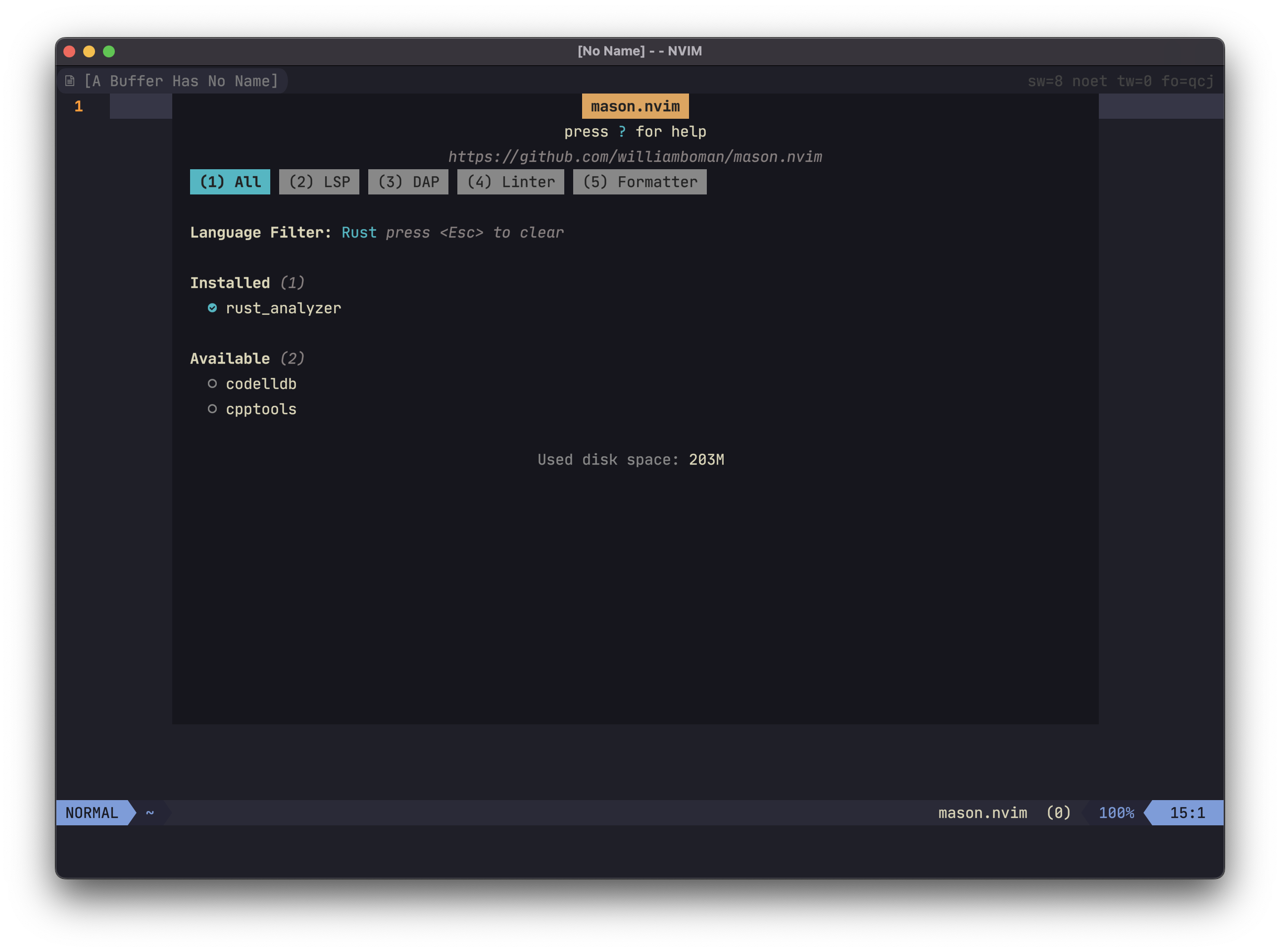
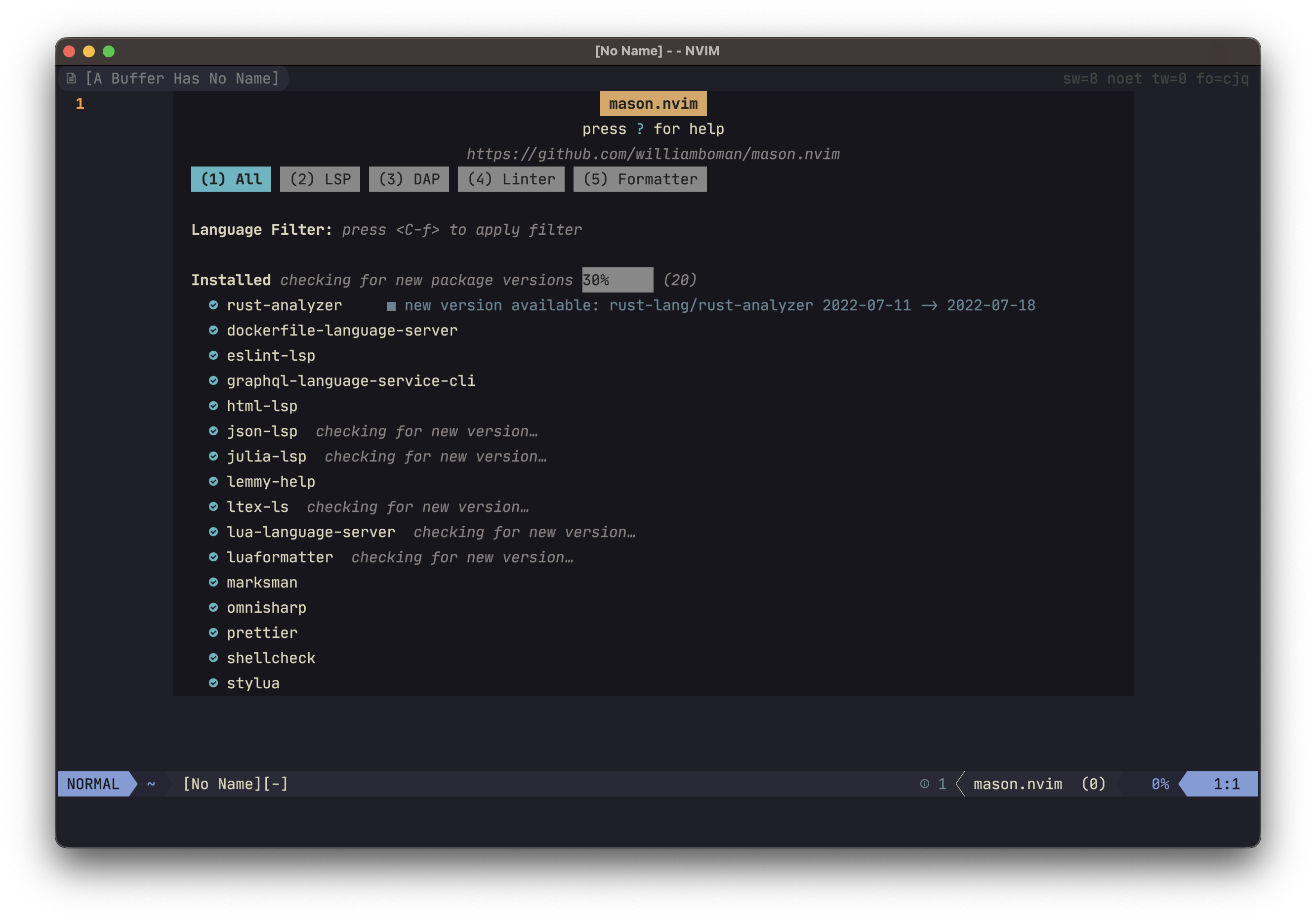
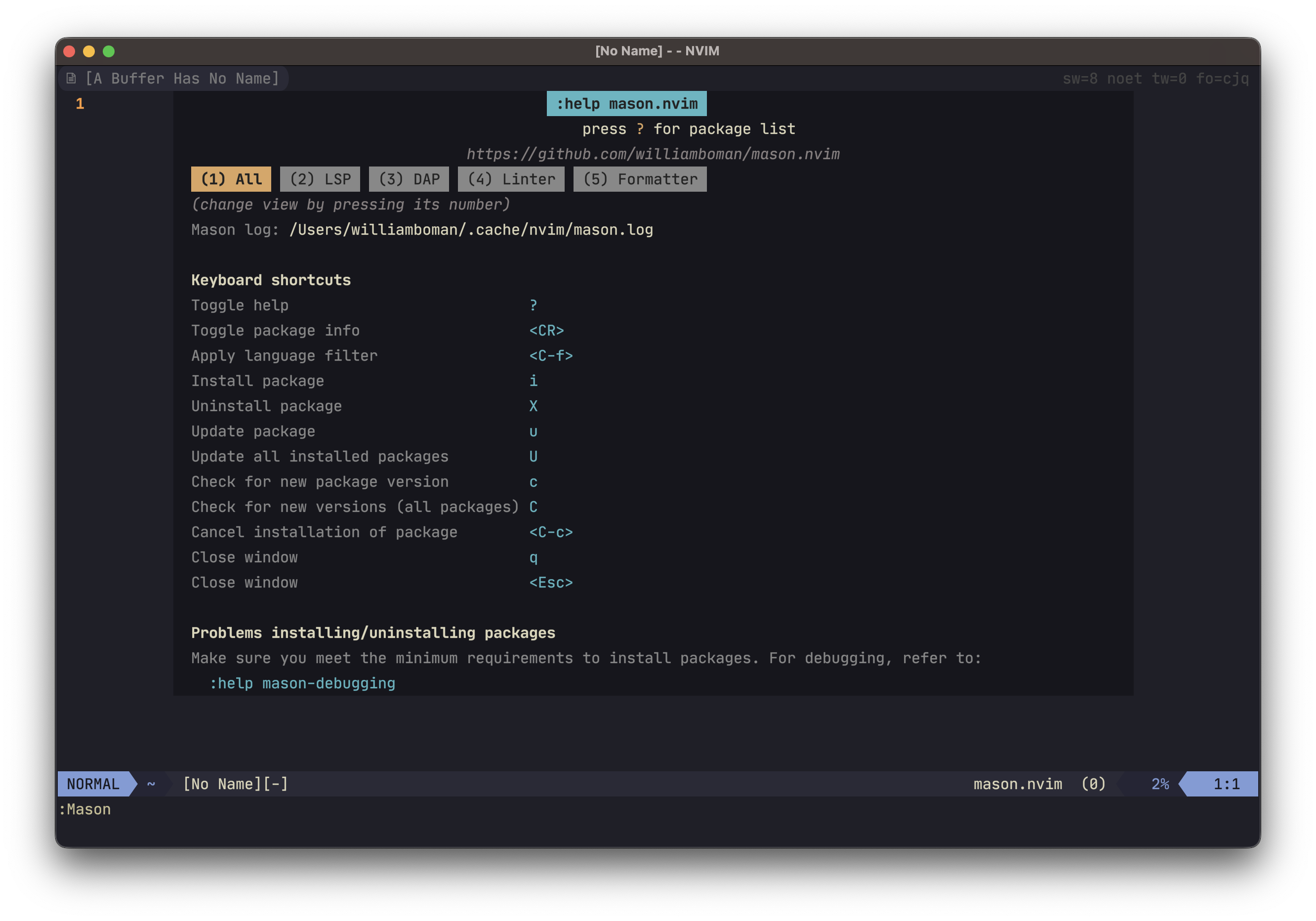
## Screenshots
| | | |
| :--------------------------------------------------------------------------------------------------------------: | :--------------------------------------------------------------------------------------------------------------: | :--------------------------------------------------------------------------------------------------------------: |
|  |
|  |
|  |
|
|
|  |
|  |
|  |
# Requirements
`mason.nvim` relaxes the minimum requirements by attempting multiple different utilities (for example, `wget`,
`curl`, and `Invoke-WebRequest` are all perfect substitutes).
The _minimum_ recommended requirements are:
- neovim `>= 0.7.0`
- For Unix systems: `git(1)`, `curl(1)` or `wget(1)`, `unzip(1)`, `tar(1)`, `gzip(1)`
- For Windows systems: powershell, git, tar, and [7zip][7zip] or [peazip][peazip] or [archiver][archiver] or [winzip][winzip] or [WinRAR][winrar]
Note that `mason.nvim` will regularly shell out to external package managers, such as `cargo` and `npm`. Depending on
your personal usage, some of these will also need to be installed. Refer to `:checkhealth mason` for a full list.
[7zip]: https://www.7-zip.org/
[archiver]: https://github.com/mholt/archiver
[peazip]: https://peazip.github.io/
[winzip]: https://www.winzip.com/
[winrar]: https://www.win-rar.com/
# Installation
## [Packer](https://github.com/wbthomason/packer.nvim)
```lua
use { "williamboman/mason.nvim" }
```
## vim-plug
```vim
Plug 'williamboman/mason.nvim'
```
# Setup
```lua
require("mason").setup()
```
`mason.nvim` is optimized to load as little as possible during setup. Lazy-loading the plugin, or somehow deferring the
setup, is not recommended.
Refer to the [Configuration](#configuration) section for information about which settings are available.
## Extensions
Refer to the [Wiki](https://github.com/williamboman/mason.nvim/wiki/Extensions) for a list of 3rd party extensions.
- [`mason-lspconfig.nvim`](https://github.com/williamboman/mason-lspconfig.nvim) - recommended for usage with `lspconfig`
# Commands
- `:Mason` - opens a graphical status window
- `:MasonInstall ...` - installs/reinstalls the provided packages
- `:MasonUninstall ...` - uninstalls the provided packages
- `:MasonUninstallAll` - uninstalls all packages
- `:MasonLog` - opens the `mason.nvim` log file in a new tab window
# Configuration
You may optionally configure certain behavior of `mason.nvim` when calling the `.setup()` function. Refer to the
[default configuration](#default-configuration) for a list of all available settings.
Example:
```lua
require("mason").setup({
ui = {
icons = {
package_installed = "✓",
package_pending = "➜",
package_uninstalled = "✗"
}
}
})
```
## Default configuration
```lua
local DEFAULT_SETTINGS = {
ui = {
-- The border to use for the UI window. Accepts same border values as |nvim_open_win()|.
border = "none",
icons = {
-- The list icon to use for installed packages.
package_installed = "◍",
-- The list icon to use for packages that are installing, or queued for installation.
package_pending = "◍",
-- The list icon to use for packages that are not installed.
package_uninstalled = "◍",
},
keymaps = {
-- Keymap to expand a package
toggle_package_expand = "",
-- Keymap to install the package under the current cursor position
install_package = "i",
-- Keymap to reinstall/update the package under the current cursor position
update_package = "u",
-- Keymap to check for new version for the package under the current cursor position
check_package_version = "c",
-- Keymap to update all installed packages
update_all_packages = "U",
-- Keymap to check which installed packages are outdated
check_outdated_packages = "C",
-- Keymap to uninstall a package
uninstall_package = "X",
-- Keymap to cancel a package installation
cancel_installation = "",
-- Keymap to apply language filter
apply_language_filter = "",
},
},
-- The directory in which to install packages.
install_root_dir = path.concat { vim.fn.stdpath "data", "mason" },
pip = {
-- These args will be added to `pip install` calls. Note that setting extra args might impact intended behavior
-- and is not recommended.
--
-- Example: { "--proxy", "https://proxyserver" }
install_args = {},
},
-- Controls to which degree logs are written to the log file. It's useful to set this to vim.log.levels.DEBUG when
-- debugging issues with package installations.
log_level = vim.log.levels.INFO,
-- Limit for the maximum amount of packages to be installed at the same time. Once this limit is reached, any further
-- packages that are requested to be installed will be put in a queue.
max_concurrent_installers = 4,
github = {
-- The template URL to use when downloading assets from GitHub.
-- The placeholders are the following (in order):
-- 1. The repository (e.g. "rust-lang/rust-analyzer")
-- 2. The release version (e.g. "v0.3.0")
-- 3. The asset name (e.g. "rust-analyzer-v0.3.0-x86_64-unknown-linux-gnu.tar.gz")
download_url_template = "https://github.com/%s/releases/download/%s/%s",
},
}
```
|
# Requirements
`mason.nvim` relaxes the minimum requirements by attempting multiple different utilities (for example, `wget`,
`curl`, and `Invoke-WebRequest` are all perfect substitutes).
The _minimum_ recommended requirements are:
- neovim `>= 0.7.0`
- For Unix systems: `git(1)`, `curl(1)` or `wget(1)`, `unzip(1)`, `tar(1)`, `gzip(1)`
- For Windows systems: powershell, git, tar, and [7zip][7zip] or [peazip][peazip] or [archiver][archiver] or [winzip][winzip] or [WinRAR][winrar]
Note that `mason.nvim` will regularly shell out to external package managers, such as `cargo` and `npm`. Depending on
your personal usage, some of these will also need to be installed. Refer to `:checkhealth mason` for a full list.
[7zip]: https://www.7-zip.org/
[archiver]: https://github.com/mholt/archiver
[peazip]: https://peazip.github.io/
[winzip]: https://www.winzip.com/
[winrar]: https://www.win-rar.com/
# Installation
## [Packer](https://github.com/wbthomason/packer.nvim)
```lua
use { "williamboman/mason.nvim" }
```
## vim-plug
```vim
Plug 'williamboman/mason.nvim'
```
# Setup
```lua
require("mason").setup()
```
`mason.nvim` is optimized to load as little as possible during setup. Lazy-loading the plugin, or somehow deferring the
setup, is not recommended.
Refer to the [Configuration](#configuration) section for information about which settings are available.
## Extensions
Refer to the [Wiki](https://github.com/williamboman/mason.nvim/wiki/Extensions) for a list of 3rd party extensions.
- [`mason-lspconfig.nvim`](https://github.com/williamboman/mason-lspconfig.nvim) - recommended for usage with `lspconfig`
# Commands
- `:Mason` - opens a graphical status window
- `:MasonInstall ...` - installs/reinstalls the provided packages
- `:MasonUninstall ...` - uninstalls the provided packages
- `:MasonUninstallAll` - uninstalls all packages
- `:MasonLog` - opens the `mason.nvim` log file in a new tab window
# Configuration
You may optionally configure certain behavior of `mason.nvim` when calling the `.setup()` function. Refer to the
[default configuration](#default-configuration) for a list of all available settings.
Example:
```lua
require("mason").setup({
ui = {
icons = {
package_installed = "✓",
package_pending = "➜",
package_uninstalled = "✗"
}
}
})
```
## Default configuration
```lua
local DEFAULT_SETTINGS = {
ui = {
-- The border to use for the UI window. Accepts same border values as |nvim_open_win()|.
border = "none",
icons = {
-- The list icon to use for installed packages.
package_installed = "◍",
-- The list icon to use for packages that are installing, or queued for installation.
package_pending = "◍",
-- The list icon to use for packages that are not installed.
package_uninstalled = "◍",
},
keymaps = {
-- Keymap to expand a package
toggle_package_expand = "",
-- Keymap to install the package under the current cursor position
install_package = "i",
-- Keymap to reinstall/update the package under the current cursor position
update_package = "u",
-- Keymap to check for new version for the package under the current cursor position
check_package_version = "c",
-- Keymap to update all installed packages
update_all_packages = "U",
-- Keymap to check which installed packages are outdated
check_outdated_packages = "C",
-- Keymap to uninstall a package
uninstall_package = "X",
-- Keymap to cancel a package installation
cancel_installation = "",
-- Keymap to apply language filter
apply_language_filter = "",
},
},
-- The directory in which to install packages.
install_root_dir = path.concat { vim.fn.stdpath "data", "mason" },
pip = {
-- These args will be added to `pip install` calls. Note that setting extra args might impact intended behavior
-- and is not recommended.
--
-- Example: { "--proxy", "https://proxyserver" }
install_args = {},
},
-- Controls to which degree logs are written to the log file. It's useful to set this to vim.log.levels.DEBUG when
-- debugging issues with package installations.
log_level = vim.log.levels.INFO,
-- Limit for the maximum amount of packages to be installed at the same time. Once this limit is reached, any further
-- packages that are requested to be installed will be put in a queue.
max_concurrent_installers = 4,
github = {
-- The template URL to use when downloading assets from GitHub.
-- The placeholders are the following (in order):
-- 1. The repository (e.g. "rust-lang/rust-analyzer")
-- 2. The release version (e.g. "v0.3.0")
-- 3. The asset name (e.g. "rust-analyzer-v0.3.0-x86_64-unknown-linux-gnu.tar.gz")
download_url_template = "https://github.com/%s/releases/download/%s/%s",
},
}
```